
Getting started: your first buckling analysis
Welcome to Skalnav — a public preview ahead of full release. In about 15 minutes you open a published buckling test, read the MDC knockdown beside NASA SP-8007 and then try your own shell.
Before you start. Nothing to install: Skalnav runs in the browser and is tested on current desktop versions of Chrome, Edge and Firefox. Steps marked Free run in Explorer without a login; steps marked Professional need a Professional licence or higher, or 30-Day Project Access.
Please do not upload classified or export-controlled data without agreeing it with us first (export control).
Step 1 — Open the demo case
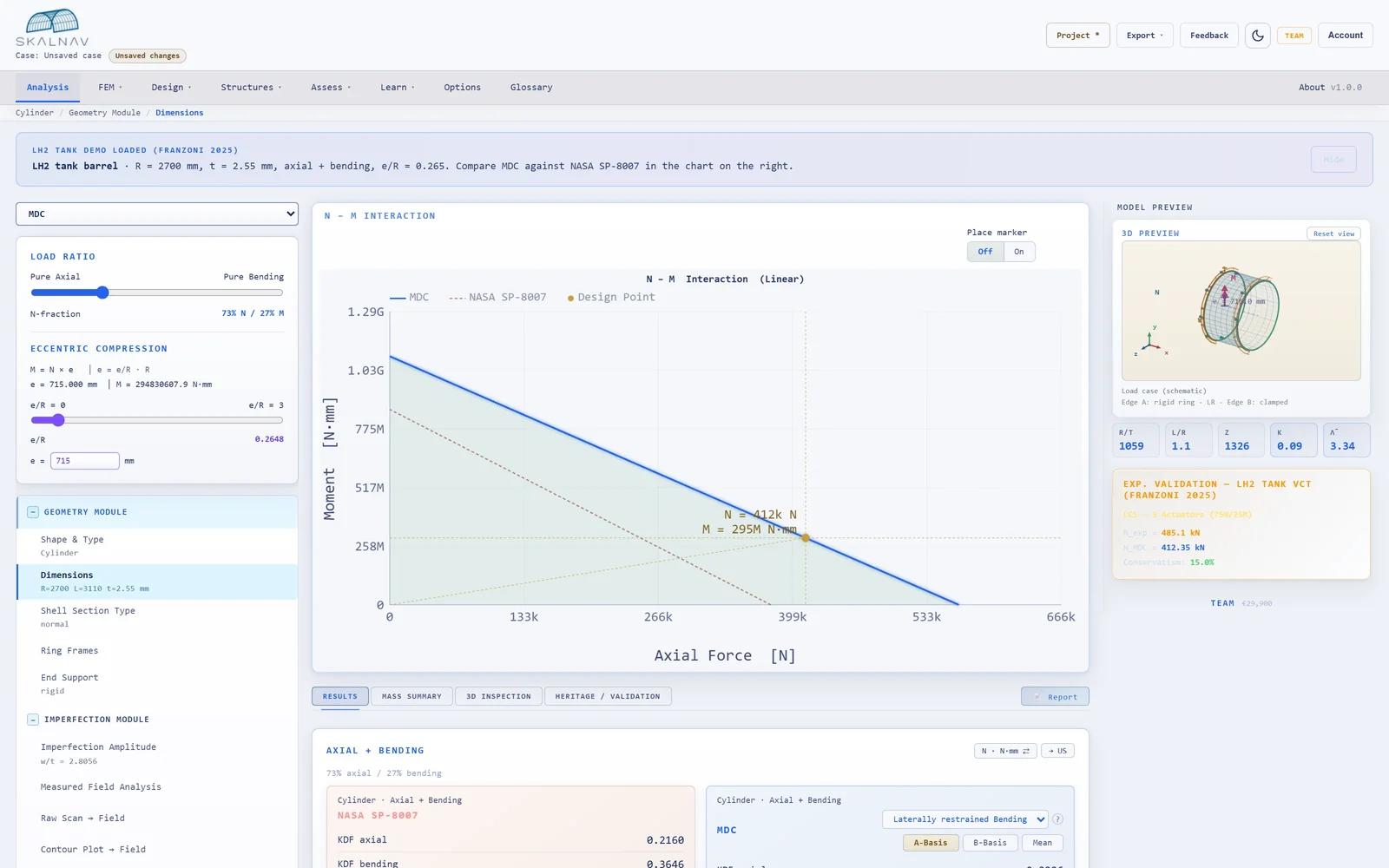
Open app.skalnav.com/?demo=lh2-tank. The app loads the case into the Analysis workspace and confirms it with the banner “LH2 tank demo loaded (Franzoni 2025)”. If a start dialog opens first, choose Skip, then Start exploring; the demo case is already loaded behind it.
The case is the LH2 tank barrel of a published buckling test (Franzoni et al. 2025): an aluminium cylinder under combined axial compression and bending, load case LC1 with three actuators, 75 % N / 25 % M. The app derives the split from e/R = 0.265; its readout can differ. Every input is editable.
Illustrative: the demo barrel from the film, outside the R/t and slenderness range of the axial collapse tests on metal cylinders with measured imperfections in the Validation Hub (R/t 1,059; these tests go up to 1,042). Your shell will differ.
Step 2 — Read the result cards
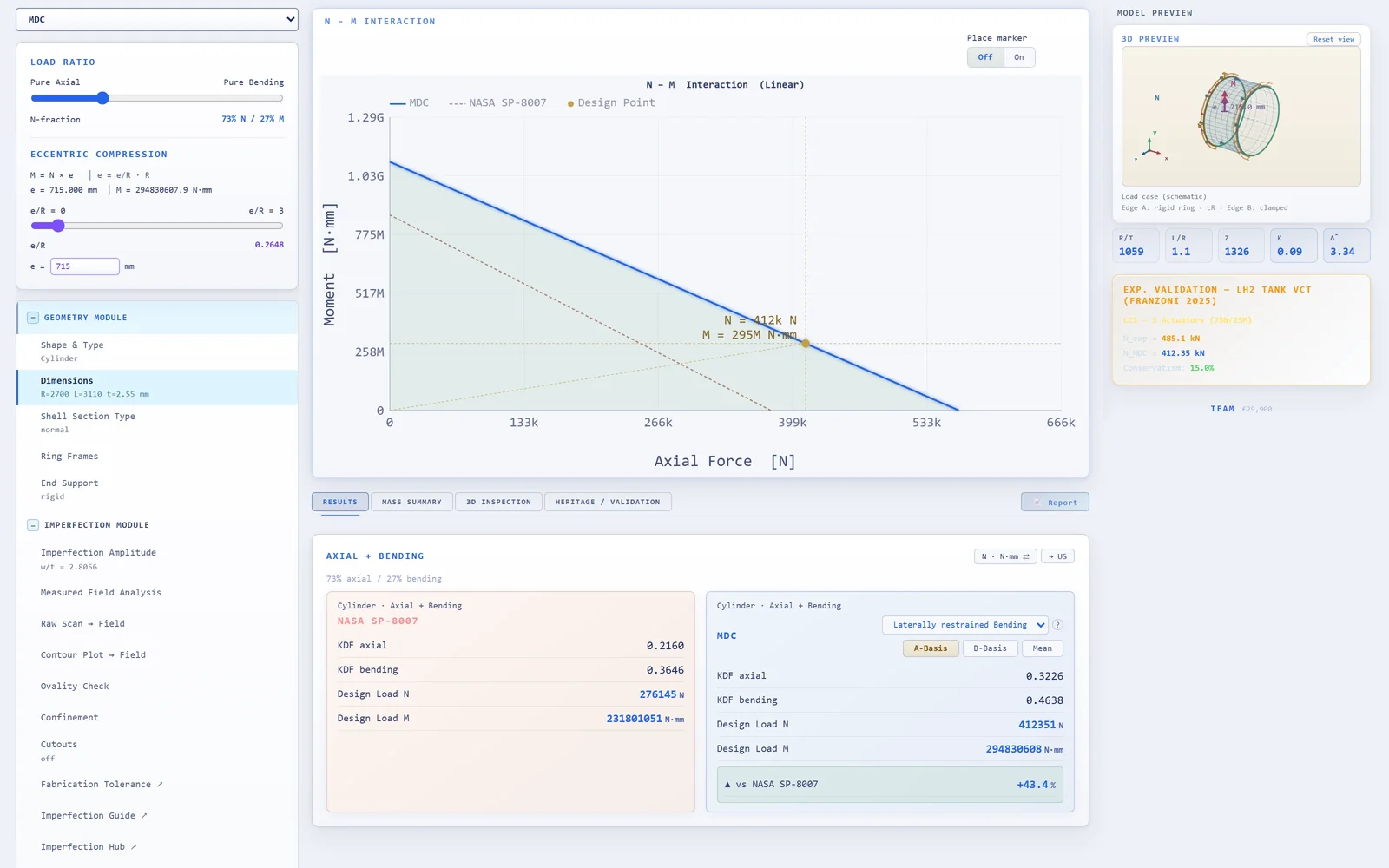
There is no “Run” button: every result on the Results tab recomputes as you type. The chart shows the design point; below it, the NASA SP-8007 card and the MDC card sit side by side. In Explorer the MDC knockdown is on the mean basis, without the plasticity correction. The card at the top right compares the MDC load with the collapse load measured on this test article. On the mean basis the MDC load can lie above it: the mean is a best estimate, not a design allowable. Step 4 adds the conservative B- and A-Basis.
Step 3 — Change the imperfection amplitude
Open Imperfection Amplitude in the input tree and change w/t. The MDC knockdown and design load follow the amplitude; the NASA SP-8007 value stays where it is, because its knockdown does not depend on the amplitude. For cylinders, amplitudes up to w/t = 8 are accepted.
Step 4 — Go further with Professional
With Professional or higher, the demo opens on A-Basis, and these open up:
- B-Basis and A-Basis, the empirical 10th and 1st percentiles of the Monte-Carlo ensemble behind MDC: switch with the A-Basis, B-Basis and Mean buttons in the MDC card.
- The plasticity correction for walls that yield before they buckle.
- The Heritage Check on the Heritage / Validation tab: for a single load case such as axial compression or bending, the collapse tests nearest to your design and a warning when the design lies outside the range of the tests MDC is checked against.
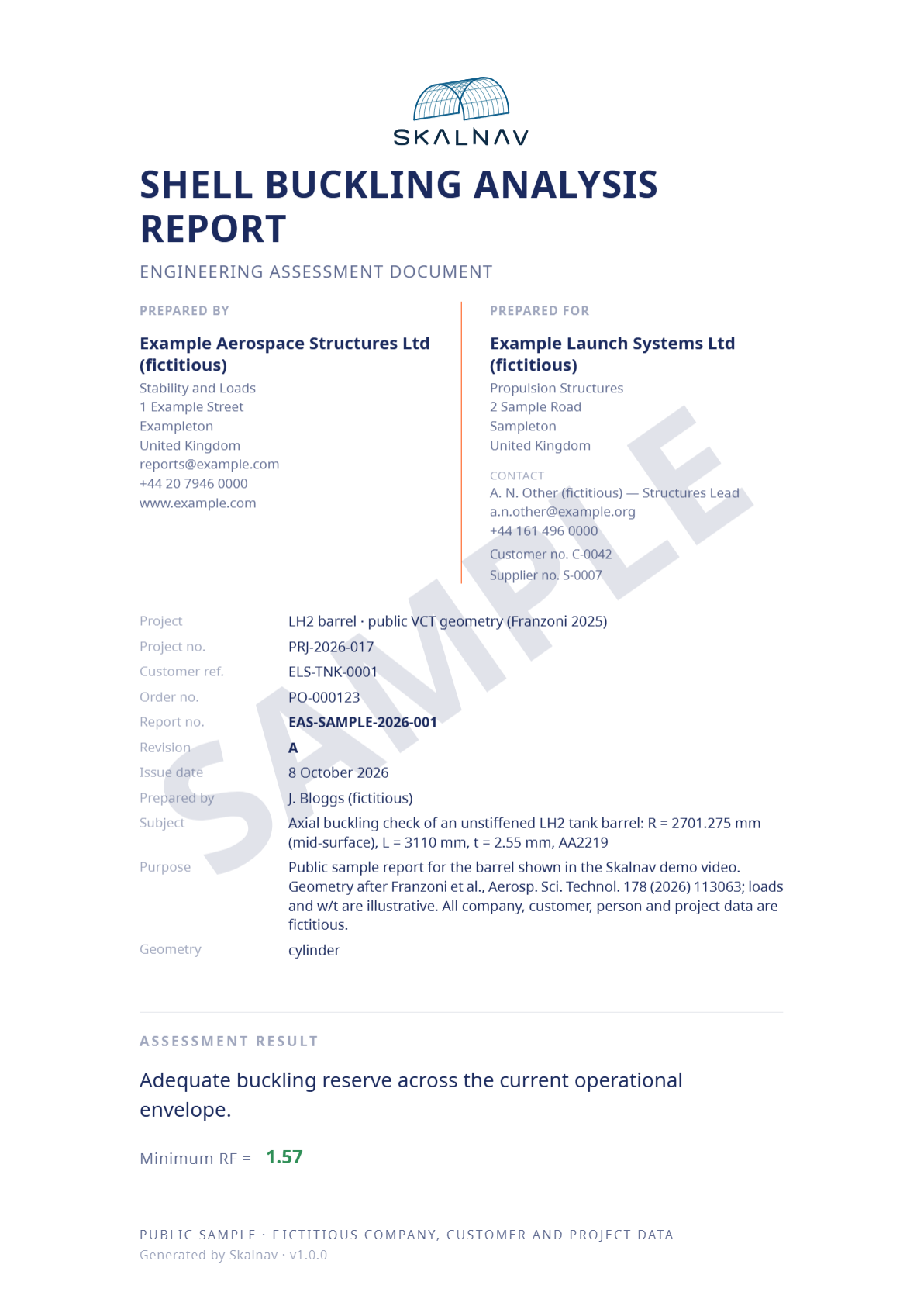
- The PDF or Word report, from the Report button or the Export menu, with the engine version stamp (build SHA + KDF schema), so every number can be traced to the engine that produced it, and an archived report can be re-checked against today’s engine.
30-Day Professional Project Access gives one engineer the full Professional core for 30 days; it does not renew.
Step 5 — Try your own case
Create a new case and enter one of your own shells: in Explorer, a cylinder under axial compression or bending; registering free lets you save it. With Professional, the Heritage Check tells you whether your design lies inside the range of the tests MDC is checked against.
Tell us what you find
A one-line e-mail to contact@skalnav.com is enough:
- Blockers: anything that stopped you from completing an analysis
- Trust gaps: any result you did not believe, and why
- Missing geometries, load cases or reference methods you need for real work
- Report gaps: anything your review process needs that the report does not contain
We read every message and answer as quickly as we can; the preview carries no guaranteed response time.
Ready for your own shell?
Open Skalnav free, or ask us anything this guide leaves open.
More: FAQ · documentation · inputs, outputs and limits
Skalnav is a calculation and decision-support tool and does not replace engineering judgment or responsibility. See Terms §9.